
- Teach the Basic Concepts of Web Dev in 20 minutes with less than 100 lines of code
- Focus on theoretical knowledge vs practical syntax
- Deep understanding of interconnected components of HTML, CSS, JS.

The worlds information is stored in files, from txt to png to gif to mp4. Files are stored in folders, servers, etc, from your laptop to a dataserver.
A web browser takes you anywhere on the internet. It retrieves information from other parts of the web and displays it on your desktop or mobile device. The information is transferred using the Hypertext Transfer Protocol, which defines how text, images and video are transmitted on the web. This information needs to be shared and displayed in a consistent format so that people using any browser, anywhere in the world can see the information.
The browser also runs a browser (rendering) engine and a javascript engine, which we will explain in a bit.
The web browser fetches data from an internet connected server and it then uses a piece of software called a rendering engine to translate that data into text and images. This data is written in Hypertext Markup Language (HTML) and web browsers read this code to create what we see, hear and experience on the internet.
Hyperlinks allow users to follow a path to other pages or sites on the web. Every webpage, image and video has its own unique Uniform Resource Locator (URL), which is also known as a web address. When a browser visits a server for data, the web address tells the browser where to look for each item that is described in the HTML, which then tells the browser where it goes on the web page.
CSS is a style sheet language used for describing the presentation of a document written in a markup language like HTML. It's changes to parent nodes cascade down to all of its children, unless the child has a specified style, which cascades down to its children but does not affect its parent or other siblings. Using Class and ID, you can target specific nodes or groups of nodes. Read the Dom if you are confused by Parent-Node Relationships.
Javascript is a programming language. The browser has a javascript engine to compile and run javascript.
The Document Object Model (DOM) is a cross-platform and language-independent interface that treats a HTML document as a tree structure wherein each node is an object representing a part of the document. The DOM represents a document with a logical tree. Each branch of the tree ends in a node, and each node contains objects. DOM methods allow programmatic access to the tree; with them one can change the structure, style or content of a document. Nodes can have event handlers attached to them. Once an event is triggered, the event handlers get executed.
When a web page is loaded, the browser creates a Document Object Model of the page, which is an object oriented representation of an HTML document that acts as an interface between JavaScript and the document itself. This allows the creation of dynamic web pages, because within a page JavaScript can:
- add, change, and remove any of the HTML elements and attributes
- change any of the CSS styles
- react to all the existing events
- create new events
The Document Object Model is a programming API for documents.
The object model itself closely resembles the structure of the documents it models.
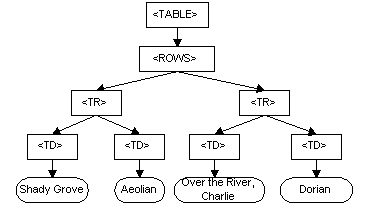
For instance, consider this table, taken from an HTML document:
<TABLE>
<ROWS>
<TR>
<TD>Shady Grove</TD>
<TD>Aeolian</TD>
</TR>
<TR>
<TD>Over the River, Charlie</TD>
<TD>Dorian</TD>
</TR>
</ROWS>
</TABLE>
The Document Object Model represents this table like this:
Environmental Science Homepage
Hackademia Website
Tictactoe
w3school - Introductory Guides to creating things with HTML, CSS, JS, and much more.
developer.mozilla.org - Advanced Guides to specific and complex components of web dev.
f12 developer tools - Used to debug, test, and explore websites inner workings.
Instagram - Great Resource for design inspiration, tutorials, and helpful tips and tricks.
Dribbble - Website specifically to showcase digital designs and creations.
Awwwards - Website specifically to showcase and rank websites that are fully developed and designed.
Google Material.IO Color Tool - Easy to use Color Picker.
Google Fonts - Massive Library of popular fonts.